Results: Tellwut Support Is Now Powered By Zendesk

Tellwut Support is now powered by Zendesk, giving members access to a searchable Help Center, easier ticket tracking, screenshot uploads and more. Read our blog to learn how the new Support experience works.
1.
1.
Tellwut Support is now powered by Zendesk. As we continue to grow, it was no longer feasible to rely solely on Outlook, which made it difficult to track, categorize, and manage support requests efficiently. With Zendesk, we can more easily track different types of tickets, prioritize urgent matters, view each member's support history and account information, and keep requests organized from start to finish. Have you ever used Outlook as your primary email before?
Yes
41%
•
110 votes
No
59%
•
158 votes
2.
2.
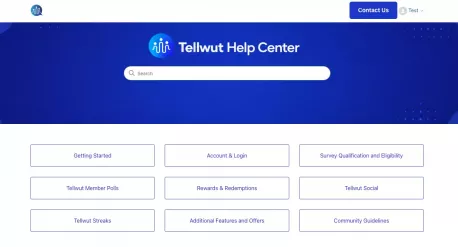
When you click Contact Us, you will now be sent to our searchable Help Center, which offers answers to common questions and helpful information about your Tellwut account, surveys, rewards, and more. If you can't find the answer you're looking for, or you need to contact us about an error or issue, simply click Contact Us at the top OR middle of the page to submit a support request to our team. Have you contacted support in the past?
Yes
63%
•
169 votes
No
37%
•
99 votes
3.
3.
If you are someone who contacts us frequently and you don’t want to go through the FAQ page each time, you can always bookmark the direct Contact Us link in your browser so you can access the support form right away.
Are you someone who bookmarks links you use often?
Yes
42%
•
113 votes
No
58%
•
155 votes
4.
4.
We receive multiple emails each day asking common questions, such as how to reset a password, redeem rewards, or use certain Tellwut features. We hope the new searchable Help Center will make it much easier for members to quickly find this information, rather than having to wait for a reply from our team. Our AI chatbot can also help answer simple questions like these and point you toward the right information. This is especially helpful during evenings and weekends, when our support team is not available. Please note this feature is OPTIONAL for members who need quick support, you do not need to use the chatbot if you need to contact us. Do you prefer a clickable/searchable FAQ page rather than one standard page?
Yes
32%
•
86 votes
No
16%
•
44 votes
Undecided
51%
•
138 votes
5.
5.
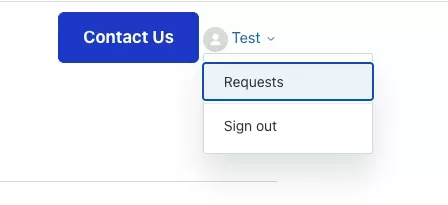
Members can also view their support requests directly through the Help Center. When you're signed in, you can see your current and past tickets, check their status, add comments and photos and review previous conversations with our support team. You can click your name and then Requests in the upper right corner to view your ticket history. This makes it much easier to keep track of an issue without having to search through your email for past messages. It's also helpful if, for any reason, you don't receive one of our email replies, as you can still view our response directly in your support area. Have you used the new contact us page?
Yes
18%
•
49 votes
No
82%
•
219 votes

Comments